Different layouts, buyer item codes and batches of orders in one file. Order Desk is built to make sense of the purchase orders your business actually receives, then put the important decisions in front of your team.
PDF · Excel · CSV · Images · Text / Human review before draft creation
01 / THE ORDER JOURNEY
Onedocument.Everyorderinitsplace.
From the file you receive to the drafts your team approves.
Upload the document your customer sends.
Order Desk
Shopify connected
Upload a purchase order
One document can contain one PO or many.
Drop purchase order here
great-lakes-orders.pdfUploading
PDF · Excel · CSV · Email · Image
Your team approves. Order Desk creates the drafts.Illustrative walkthrough based on the app. No orders are sent.
01
Receive
Upload the document your customer sends: PDF, spreadsheet, CSV, image or text. Your customers do not need to adopt a standard order template.
02
Understand
Confirm separate POs within a PDF. Keep each PO number with its buyer, destination, products, quantities and prices.
03
Review
Check suggested customer and SKU matches, resolve uncertainty and confirm the details that matter to your business.
04
Create drafts
Approve each reviewed PO and open the resulting draft in your connected Shopify store. Your team decides the next step.
ADAPT TO THE ORDER, NOT THE OTHER WAY AROUND
Your customers keep their formats. Your team keeps control.
A spreadsheet from one buyer. A scanned PDF from another. Eleven separate POs bundled into a single document. Bring those differences into one review process, with each order’s details kept together.
In the current pilot, you confirm whole-page PDF groups before each PO is prepared. Difficult scans, shared-page orders and unusual layouts can still need help. We test representative documents with you during onboarding.
Customer names and item codes do not always arrive exactly as they appear in your store. Order Desk weighs the available evidence, keeps uncertainty visible and gives your team the final say.
01 / CONFIDENCE
See what needs a closer look.
Customer and destination details help distinguish possible customer matches. SKU and formatting checks help resolve products. Confidence reflects the evidence behind a suggestion, so uncertainty stays part of the review.
02 / CONFIRMED MEMORY
Keep useful corrections.
Where matching memory is enabled, use “Save for future” to retain a confirmed customer or SKU relationship. A later order with the same relevant context can reuse that mapping after current data is checked.
03 / YOUR CONTROL
Review still comes first.
Saved matches do not override conflicting evidence or approval checks. You can correct a suggestion or forget a saved match. One-off price and quantity edits do not automatically become permanent rules.
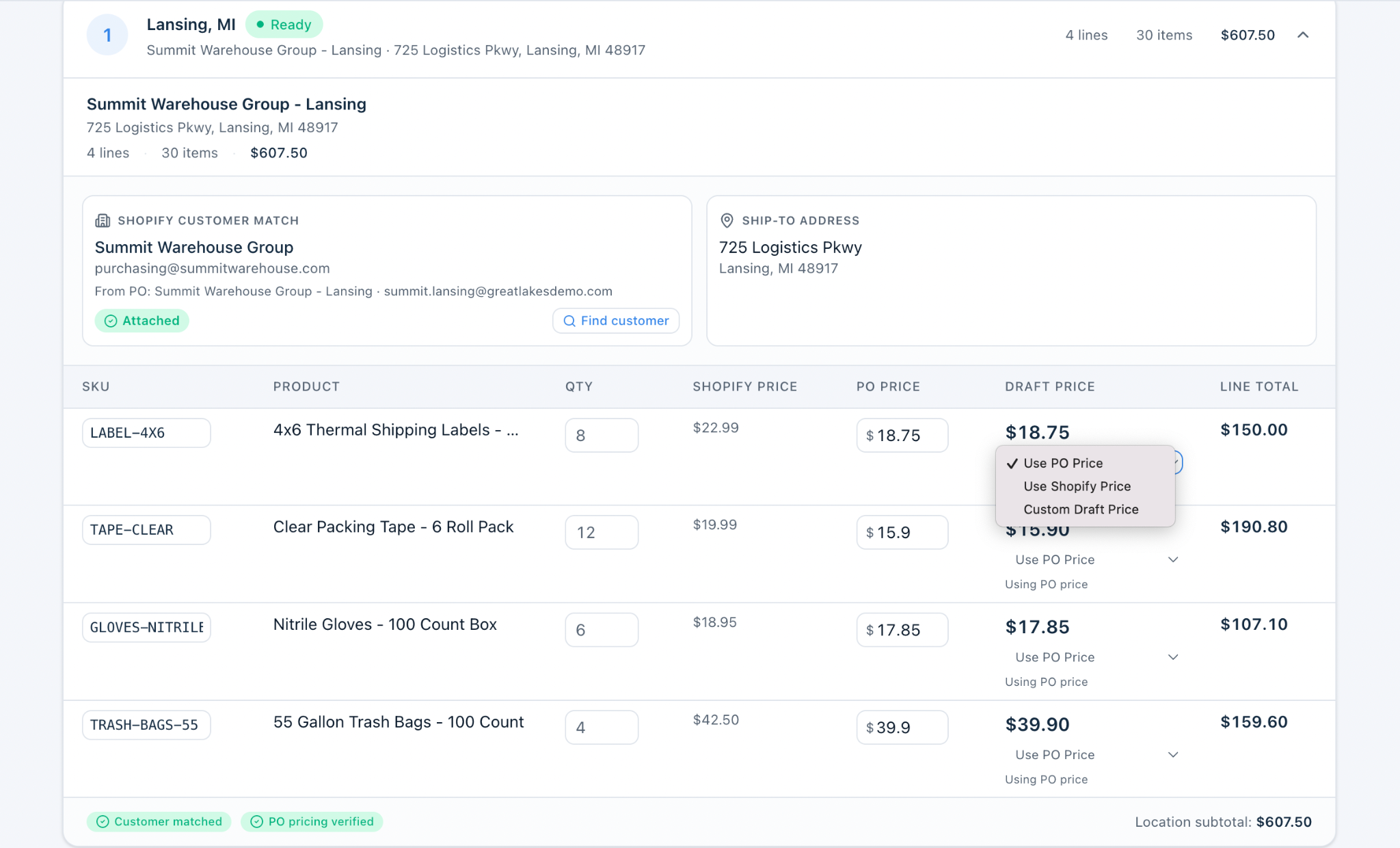
Confirm the buyer and destination, resolve a product match, adjust a quantity and choose the intended price. Keep a useful customer or SKU correction for next time when matching memory is enabled.
Actual application capture · example data
REVIEW SAFEGUARDS
Youstayincontrol.
Order Desk prepares the work. Your team makes the decisions.
01
Checkbeforecreating.
Review the customer, destination and products before creating Shopify drafts.
02
Makethedetailsright.
Change the customer, SKU, quantity or price when an order needs attention.
03
Keepordersseparate.
Review individual location orders with their own line items and totals.
The output is a Shopify draft for your team’s next step.
Your company. Your store.
Company membership and the connected store are checked before order operations. A company cannot select another company’s Shopify connection.
Approval stays deliberate.
Readiness checks can block incomplete or conflicting orders. Preparing a PO does not create a draft; creating a draft does not send an invoice, collect payment or fulfill it.
Uncertain results get checked.
If an approval request is interrupted, the saved attempt must be checked before another submission. Confirmed drafts stay attached to their PO to help prevent duplicates.
Your workspace is on the web.
Use your browser to upload, review and approve. Start with your company’s invitation and authorize the correct Shopify store during setup. No Shopify Admin token needs to be copied into your workspace.